
One of the things I love about my job is being able to build unique solutions for customers. Yes, I know how to build a landing zone architecture in Azure, or a hub and spoke network, but I tend to have the most fun, when I open my Teams chat with Denny and John, and ask “is this stupid?” Sometimes, the existing solutions don’t work for a client and you need to build something custom that works for the customer. Other times, we get bottled by a licensing requirement and have to do a workaround. I once setup Oracle on Windows Server Failover Cluster, with Sios on AWS, because that was the only way to make something work. Today’s scenario was dynamic groups in Entra.
While our customer did have some P1 and P2 Entra licenses, they didn’t have enough licenses to cover the entire org. While Microsoft will let you use P1 and P2 Entra features as soon as you have 1 license, to be in compliance you have to have licenses for every user covered. While there are some interesting discussions around licensing workarounds, and what is a user (particular in tenants that are customer facing), in this case the customer was a pretty traditional enterprise. So we simply didn’t have to licenses.
The feature in question was dynamic groups. The concept of dynamic groups is cool—you define a group based on Active Directory or Entra attributes and users get automatically added (or removed) from those groups. However, as mentioned—dynamic groups require P1 Entra, and we didn’t have it.
In this instance the dynamic group we wanted to create was a group called “Fabric All Users”. We wanted all users to be able to have access to a newly created Rayfin app, and no such group existed. If this was a dynamic group we would have used the following rule:
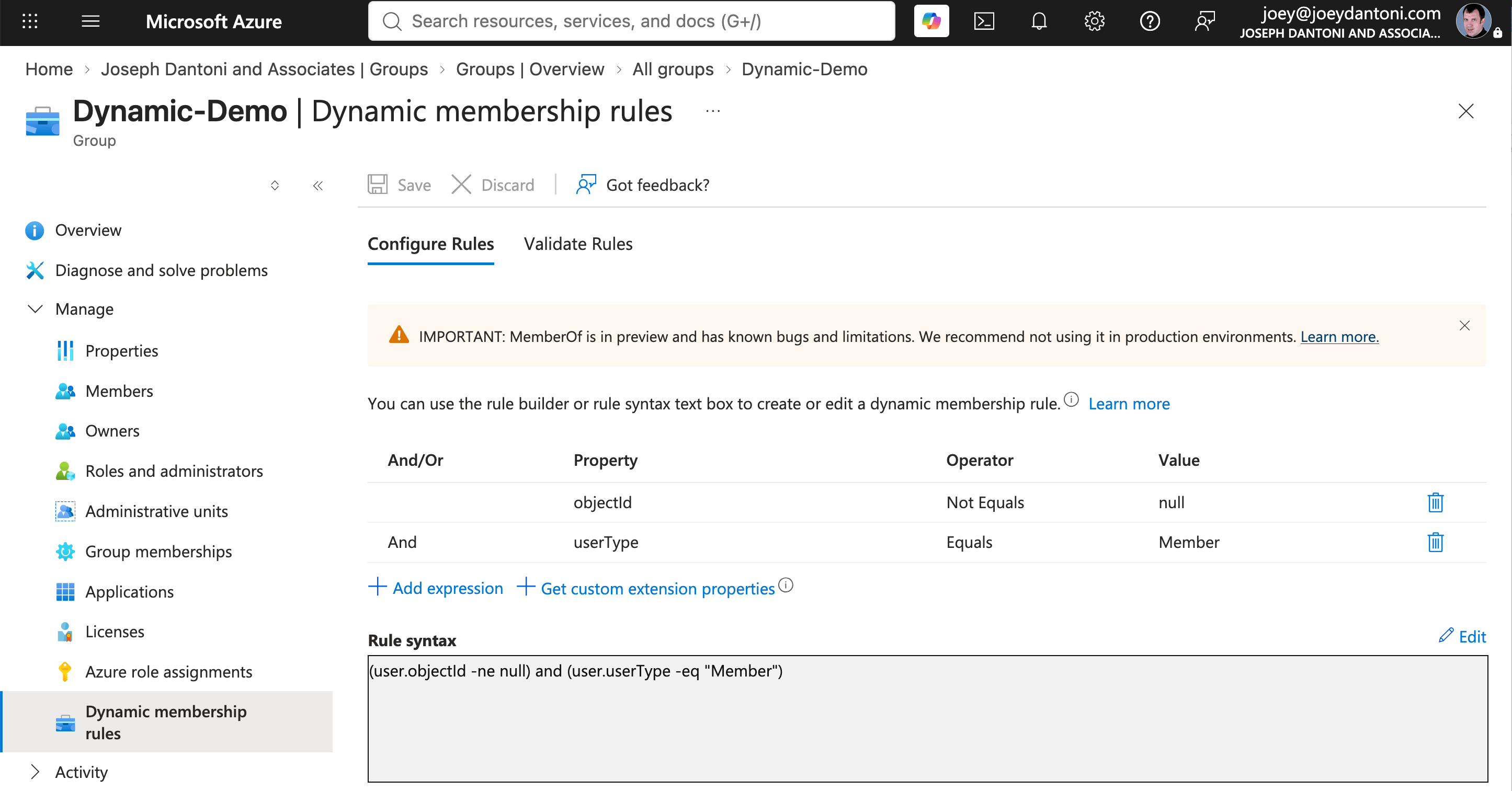
This is a group that includes all members (not guests) from my Azure tenant.
To do the same without P1, I had to get a little more creative. So I turned to my old friend Azure Automation. In the early days of Azure, trainers and MVPs always joked that the answer to anything you couldn’t do in the portal was an Automation runbook. Runbooks are nearly always written in PowerShell (there is a Python option, I’ve never seen one in production), and operate on the control plane in Azure. Control plane is a fancy way of saying that you are operating on Azure resources and not in them. If you want to operate on something within a VM or a database, you need to do something else (hybrid runbooks exist for VM actions, you can run database commands from a “normal” automation runbook.
The notion of my automation job here, was to create a runbook that could list all of the users in Entra and then add them to my group. That solves my immediate need. However, people come and go from companies. That means we need this runbook to be dynamic. And anyone who’s built a data warehouse, knows that truncate and reload is a terrible strategy for ingesting data. I added some logic to do a comparison, and only add changed records. We’re just doing all of this delta logic in PowerShell—we’re not storing state anywhere but the group itself.
Permissions use the Automation account’s managed identity. In order to do this, that identity needs a couple of roles—it needs User.Read.All, obviously to read all of the users and their attributes. However, it also needs another pricklier permission—GroupMember.ReadWrite.All. To avoid granting that, I use another Entra feature called administrative units. Administative units allow you to grant directory permissions to a user, managed identity or group, but limiting the scope of those directory permissions to a specified group(s). In my case, the Automation accounts identity has group admin only on our Fabric_All_Users group.
If you ever examine licensed features, there are usually creative ways you can build those things yourself. For example, Denny once clustered SQL Server Express Edition. The architectural decision you need to make revolve around how supportable they are going forward. In our case, this is likely a short term decision while we get licensing sorted. If you go down a path like this, make sure you document everything well, and share your knowledge across your team. But it’s the most interesting part of what we do! You can see the code we used to build this at our GitHub repo.