
Are you a user of VS Code, but you wish that the MSSQL extension had more of the SQL Server Management Studio features? Good news, there’s now a VS Code Plugin that gives you those capabilities in VS Code by using the “SSMS Tools for SQL Server” extension.

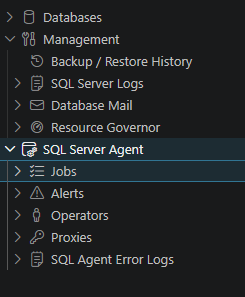
Once the extension is installed, use the SQL Server extension like normal. To access the SSMS Tools extension, right-click on the server and select “Open in SSMS Tools”. This will give you access to various SQL Server Management Studio features like the Query Store (which we’ve rolled in from our Query Store Extension), including the ability to modify the Query Store properties, SQL Server Backup History, SQL Server Log Management, Resource Governor configuration, and SQL Server Agent configuration and monitoring, including Agent Jobs, Alerts, Operators, Proxies, and Logs. You’ll get these same options for both on-premises SQL Servers and Azure SQL Server Managed Instances.
Additional features will be getting rolled into this feature that people need and use from SQL Server Management Studio.
For Azure SQL DB servers, the extension displays the event log and database resource usage for the databases on the server.
This extension will significantly close the gap between SQL Server Management Studio and the MSSQL extension from Microsoft.
You can find the extension online via GitHub or in the VS Code extension library by searching for “ssms” and installing the “SSMS Tools for SQL Server” extension.
Denny